To facilitate manufacturers in quickly setting up machines or saving machine configuration files during mass production, all settings of the controller can be saved to our cloud server. These settings can then be loaded onto other ENC controllers to complete the machine setup process quickly and easily.
Settings that will be saved:
⭐: Startup image
⭐: All system settings
⭐: OpenGL color configuration for 3D toolpath simulation
Upload settings #
Just click on <Upload System Settings>, and you will be prompted that the upload was successful, along with the name of the settings file you uploaded.
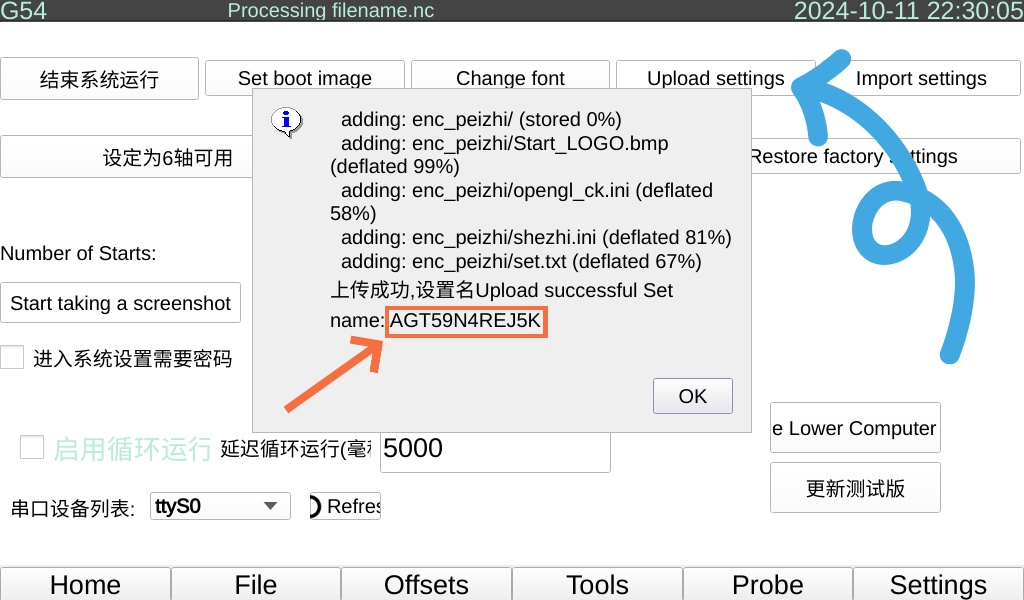
Import Settings #
After uploading the settings, click on <Import System Settings>. The system will download the settings file associated with your WiFi name from the server and apply the settings. Therefore, before doing this, you should change your WiFi name to inform the system of your settings file name, such as: AGT59N4REJ5K
In this way, on a newly assembled machine, you only need to connect to the WiFi and click on <Import System Settings>.


